






Platform
Apps

The platform that
builds itself.

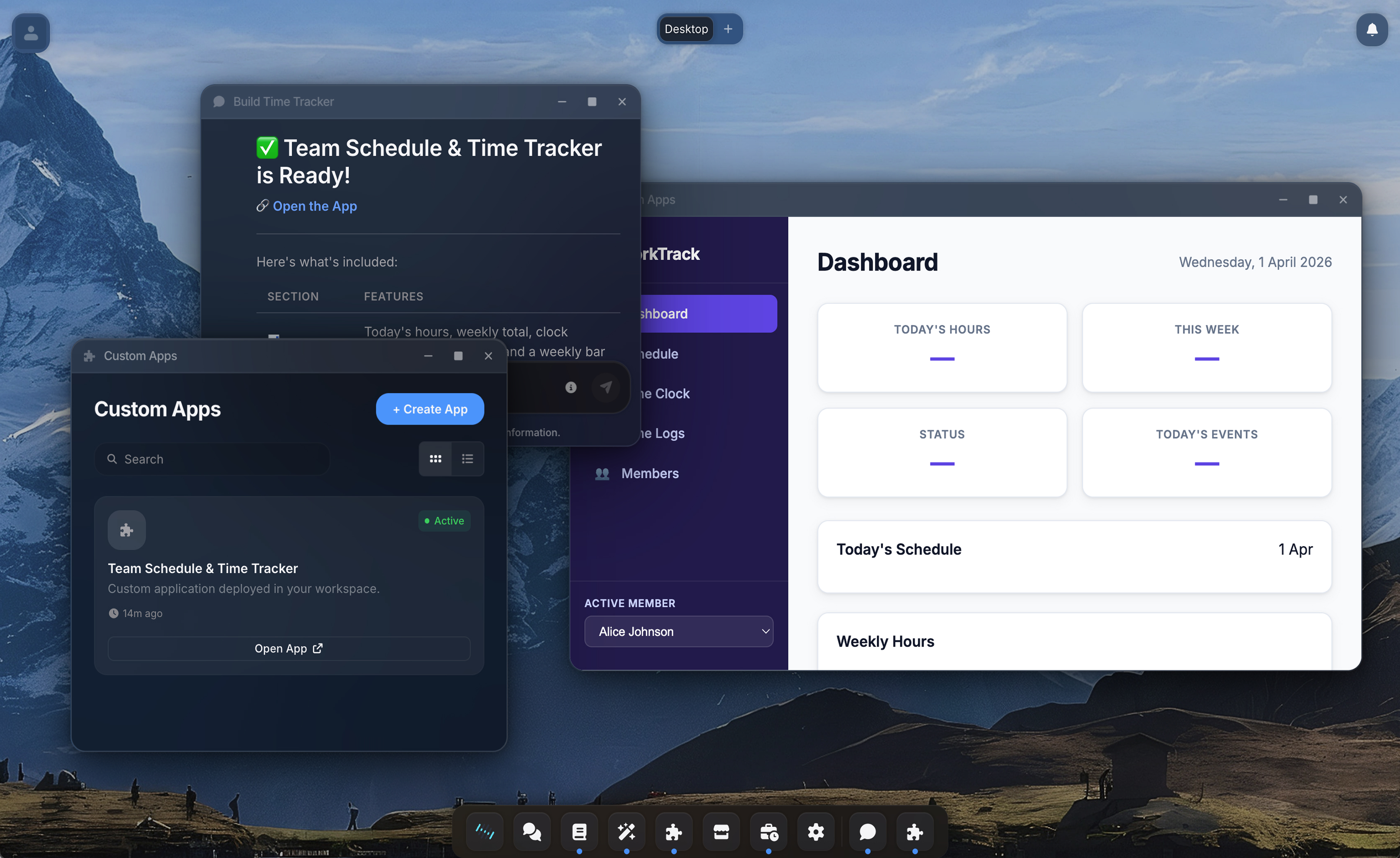
When Team Assistant is missing a feature, your agent builds it. Custom apps are full web applications that integrate seamlessly into your desktop, indistinguishable from built-in features.

Start FreeBook a Demo
Split view: chat conversation and deployed app running in Team Assistant
Vaults
Agent Studio
Apps
Computer
Connections
Desktop
Marketplace
Scheduled
Security
Apps
Capabilities

Self-extending by design.

Custom apps turn Team Assistant into exactly the platform your organization needs.

01

Missing a feature? Your agent builds it.

Your team needs a CRM but you don't want another SaaS subscription. You tell your agent what you need. It writes the code, provisions a database, and deploys the app into your workspace. It shows up in your dock, opens in a floating window, and works like any other part of Team Assistant. The line between platform and custom app disappears.

Describe it
Agent codes
App is live
02

Agents build their own tools.

Sometimes an agent needs something the platform does not have: a structured database to track data across conversations, a lookup table for client codes, a dashboard that persists between sessions. The agent builds it as a custom app, deploys it, and starts using it. The platform gets more capable every time an agent solves a new problem.

Generated tool for specific task
03

Prototype ideas without a dev environment.

A designer wants to see a layout idea come to life. A product manager wants to test a workflow before writing a spec. Tell the agent what you are imagining. It builds a working prototype, deploys it to a live URL, and you interact with it immediately. Iterate through conversation until it looks right.

Describe it
https://my-app.ta.io
04

Every app is a first-class citizen.

Custom apps get their own subdomain, their own database, and built-in authentication. Users log in with their existing Team Assistant credentials. The app opens inside the desktop environment alongside chat, vaults, and everything else. Share it with your team through the Marketplace.

My App
How It Works

From conversation to running app.

1

Describe what you need

Open a chat with your agent and describe the application. "Build me an inventory tracker that stores items in a database and lets me search by category." Be as specific or as vague as you want.

2

The agent builds it

The agent writes the application, provisions a database, deploys the container, and tests it. If something breaks, it reads the logs, fixes the issue, and rebuilds.

3

It appears in your dock

The app is live, with its own URL and authentication. Click it and it opens in a window on your desktop. It is a real web application that feels like a native part of the platform.

4

Iterate through conversation

Come back anytime and ask the agent to add features, fix bugs, or redesign the UI. The agent reads the existing code from the vault, makes changes, rebuilds, and tests. Your app keeps getting better.

5

Share with your team

Publish the app to the Marketplace so your colleagues can install and use it. They get a running app with one click.

Under the hood

Built for technical teams.

Click to expand each section.

  • Authentication is handled by the platform. The agent cannot build an app that bypasses login or exposes data to unauthenticated users.
  • Outbound network access is controlled by a proxy with domain allowlists. The agent cannot build an app that leaks data to arbitrary domains or exfiltrates credentials.
  • Each app is isolated in its own container and database. A broken or malicious app cannot affect other apps or the platform itself.
  • Maximum blast radius: users who have been granted access to that specific app. The agent cannot grant access to users outside the organization.
  • Each app runs in an isolated network. Apps cannot communicate with each other or reach internal platform services.
  • App source code is version-tracked in a vault. The agent rebuilds and redeploys through conversation.
  • CPU and memory limits enforced per container. Idle apps wake automatically when accessed.
  • Each app gets a dedicated database with its own credentials. Cross-app database access is impossible.
  • Secrets are encrypted at rest and injected at container startup. The agent cannot read them back after initial setup.
In practice

Internal expense tracker. Built in 20 minutes.

We needed an expense tracking tool but could not justify a SaaS subscription for 15 people. I opened Team Assistant and told the agent: "Build me an expense tracker where employees can submit expenses with receipts, managers can approve them, and finance can export reports."

Twenty minutes later, I had a working app with a database, file uploads, role-based views, and a CSV export. The agent built a Node.js backend with Express and Prisma, a React frontend with a responsive dashboard, three user roles, and a receipt upload feature.

We have been using it for three weeks. When something needed changing, I just told the agent. No tickets, no sprints, no deploys. The app lives on its own subdomain with full authentication, and my team treats it like any other SaaS tool.

What the agent built
Backend: Node.js + Express + Prisma ORM
Database: PostgreSQL (managed, auto-scaling)
Frontend: React with responsive dashboard
Roles: Employee, Manager, Finance
Features: Receipt upload, CSV export, approval flow
Live at: abc123.apps.teamassistant.com
Explore more
Computer
The sandbox where apps are built and run
Marketplace
Share apps across your organization