






Platform
Connections

Connect your agents to
every tool your team uses.

Gmail, Jira, Monday.com, Confluence, Slack, GitHub, Google Calendar, and any API with a URL. Team Assistant handles authentication transparently so your agents just work.

Start FreeBook a Demo
Connection hub with service integrations
Vaults
Agent Studio
Apps
Computer
Connections
Desktop
Marketplace
Scheduled
Security
Connections
Capabilities

One secure gateway for every API.

Agents connect to external services. The platform handles credentials, logging, and access control.

01

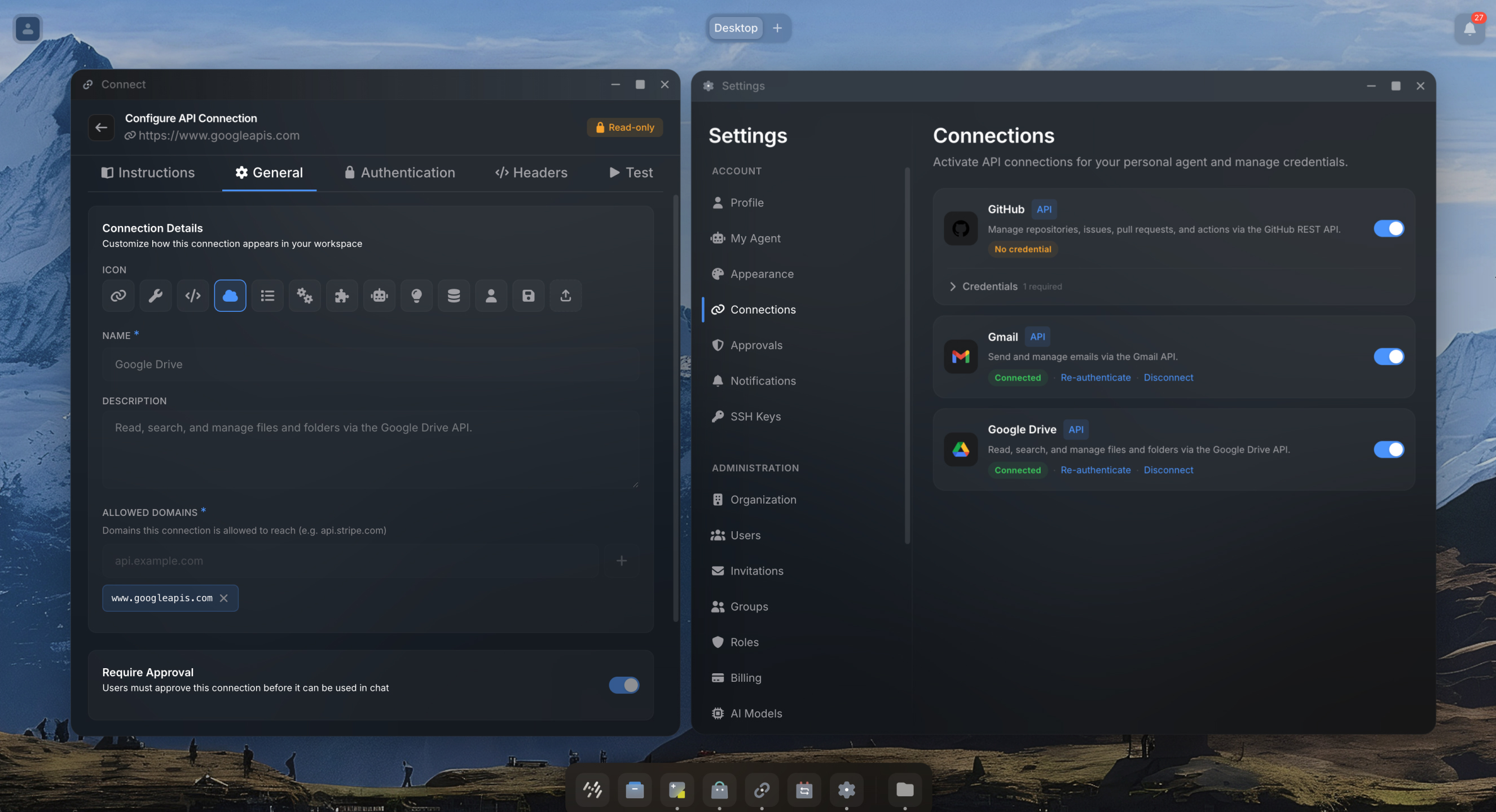
Set up once, everyone authenticates themselves.

An admin creates the connection: target service, authentication type, and scopes. Then shares it with the team. Each team member visits their settings, toggles on the connections they need, and logs in with their own account. The agent uses their individual credentials. When someone leaves, you revoke their access. Everyone else keeps working.

02

Your agent authenticates inline.

When an agent needs a connection the user has not set up yet, it prompts them right in the conversation. Complete an OAuth consent flow or enter an API key without leaving the chat. Once authenticated, the agent picks up where it left off.

AuthorizeOAuth consent
03

Any API with a URL.

Pre-built blueprints for Gmail, Jira, Confluence, Slack, Google Calendar, Monday.com, GitHub, and more. Blueprints come with domains, scopes, and setup instructions already configured. For anything else, point your agent at any HTTP API and the platform handles credential injection transparently.

Gmail
Jira
Slack
GitHub
Monday
Add
04

Every request is logged and auditable.

Every outbound API request from an agent is logged with the target domain, method, path, status code, and timestamp. Users control which agents can use which connections, with session-scoped or permanent approval preferences. Admins see usage across the entire organization.

gmail.googleapis.com200
api.monday.com200
jira.atlassian.net401
api.github.com200
How It Works

From setup to authenticated in minutes.

1

Create or install a connection

Open the Connection Wizard. Pick a blueprint for common services like Gmail or Jira, or configure a custom API connection with your own domains and authentication type.

2

Share with your team

Share the connection with individuals, groups, or your entire organization. Each person authenticates with their own account.

3

Agents use it transparently

When an agent calls an external service, the platform injects the correct credentials automatically. If credentials are missing, the agent prompts the user inline and resumes after authentication.

4

Monitor usage

Every request is logged. Users control which agents can use which connections. Admins see usage and can revoke access at any time.

Under the hood

Built for technical teams.

Click to expand each section.

  • MCP (Model Context Protocol) for tool-based integrations.
  • A2A (Agent-to-Agent) for cross-agent communication.
  • HTTP API Proxy for any REST API with transparent credential injection.
  • API Key and custom headers for simple integrations.
  • OAuth User Login: each user authenticates with their own account. Tokens are stored and refreshed automatically.
  • OAuth Client Credentials: service account authentication for machine-to-machine integrations.
  • Configurable scopes per connection to control what agents can do on the user's behalf.
  • Credentials are injected by a proxy at request time. Agent code never sees secrets.
  • Secrets are write-only: the API never returns them after initial submission.
  • Every outbound request is logged for auditability.
In practice

Connecting a consulting team to their daily tools.

A consulting firm uses Team Assistant as their AI workspace. The admin creates connections for Gmail (OAuth), their time tracking tool (API key), Confluence (OAuth), and Monday.com (API key) using the connection wizard. For Gmail and Confluence, the admin registers the organization's OAuth app. For the others, they configure API key slots.

Each consultant visits their settings, toggles on the connections they need, and authenticates. When a consultant asks their agent "Summarize my unread emails and log the time I spent on the Siemens project today," the agent reads Gmail, writes to the time tracker, and the user never has to copy-paste credentials or switch tabs.

When a new team member joins, the admin shares the connections with them. They authenticate with their own accounts in under a minute. Every request the agent makes is logged and auditable.

Connection Hub
Team
Assistant
Gmail
Jira
Slack
GitHub
Monday
Confluence
Explore more
Agent Studio
Configure connections per agent
Security
Admin controls and audit trails