






Platform
Vaults

Your knowledge.
Your agent's memory.

Git-tracked knowledge bases that both humans and agents read, write, and search. Every change is versioned. Every document is indexed. Every skill is shareable.

Start FreeBook a Demo
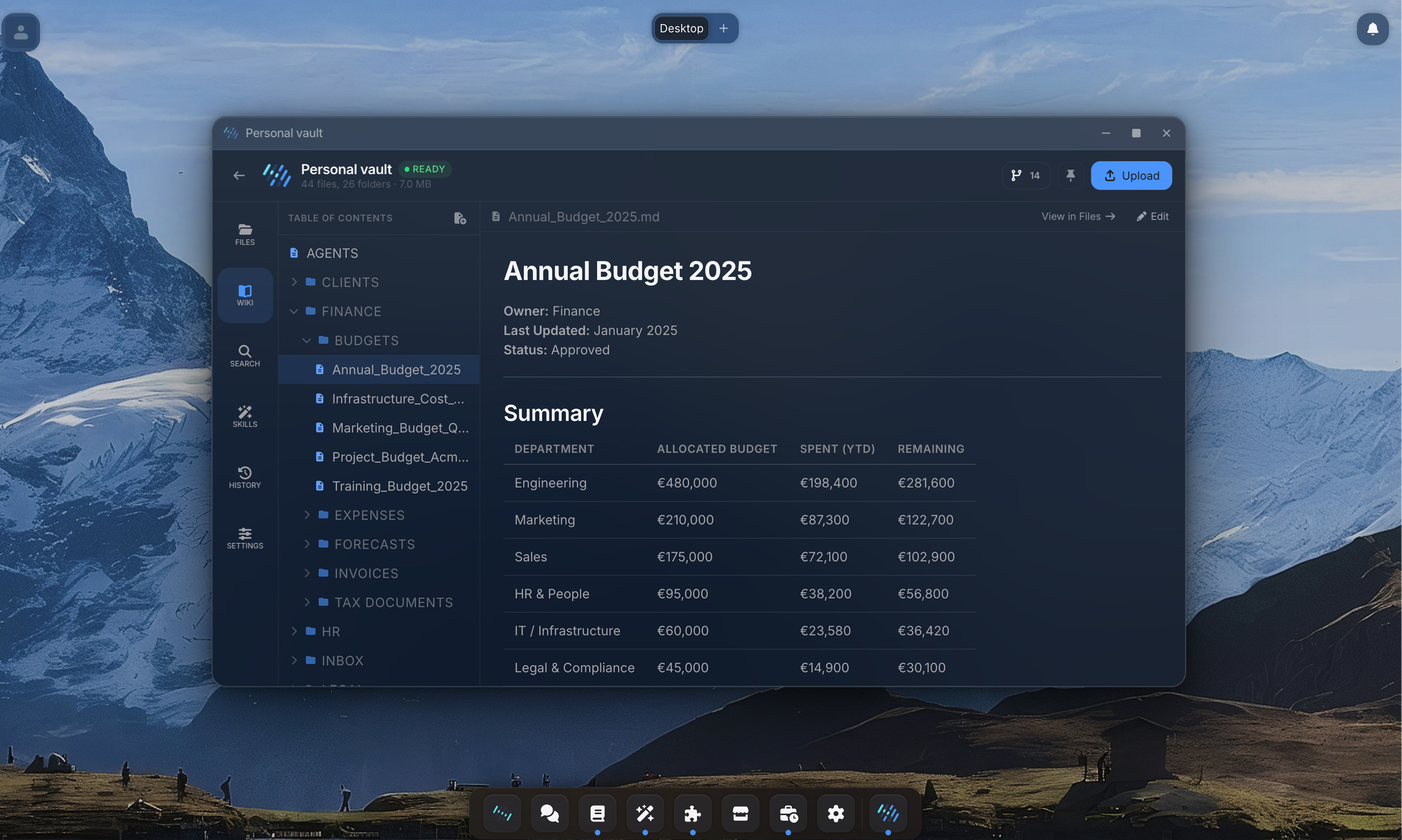
Vault wiki view with sidebar navigation
Vaults
Agent Studio
Apps
Computer
Connections
Desktop
Marketplace
Scheduled
Security
Vaults
Capabilities

More than a file store.

Vaults are living knowledge bases where humans and agents build context together.

01

Agents don't just read your docs. They contribute.

Every agent has full access to vault tools: read, write, edit, search, move, copy, and organize files. When an agent researches a topic, it saves what it learned. When it processes invoices, it logs the results. Your vault grows with every conversation, building context that makes the next conversation better.

User inputs via Chat
AI writes to vault file
Vault updates with context
02

Every change tracked. Every version recoverable.

Vaults are Git repositories under the hood. Every file change, whether made by a human or an agent, creates a versioned commit. You can browse the full history, see what changed and when, and understand how your knowledge base evolved. No more "who deleted that document?" moments.

v3.0
Process docs refined
AI Agent · 1 hour ago
v2.0
Updated invoice template
Jannik F. · 3 hours ago
v1.0
Initial vault setup
Johannes S. · Yesterday
03

Find anything. Instantly.

Vaults combine full-text search with vector-based semantic search. Upload a PDF, and Team Assistant extracts the content, chunks it, embeds it, and indexes it automatically. Your agents use the same search during conversations to find exactly the right context.

PDF
MD
CSV
Vaults
04

Reusable agent capabilities, built inside your vault.

A skill is a directory in your vault containing instructions, scripts, templates, and configuration files. Agents discover skills automatically and use them during conversations. Create a skill once, share it across your team, and install it to any vault.

05

Your vault as a living wiki.

Switch to wiki view and your Markdown files render as full pages with a table of contents. Browse your documentation like Confluence, but backed by Git and searchable by your agents. Edit inline with a split editor. No separate documentation tool needed.

Wiki View
Grid View
06

Share knowledge, control access.

Share any vault with specific team members, groups, or your entire organization. Six granular permissions (Read, Write, Delete, Share, Use, List) let you control exactly who can do what. Read-only for sensitive knowledge bases. Full read-write collaboration for team projects.

JS
John Smith
johnsmith@gmail.com
Can View
MR
Mario Rodriguez
mariorodriguez@gmail.com
Can Edit
How It Works

From upload to agent-ready in seconds.

1

Create a vault

Start with an empty vault or use a template. Your vault initializes with a Git repository, a Skills folder, and an AGENTS.md instruction file.

2

Add your knowledge

Upload files (drag and drop, multi-file, entire folders), write Markdown directly in the wiki view, or let your agents create content during conversations.

3

It gets indexed automatically

Team Assistant extracts text, chunks it, generates embeddings, and indexes everything for hybrid search. No configuration needed.

4

Agents use it

Attach the vault to any agent. During conversations, agents search for relevant context, read specific files, write new content, and execute skills.

5

Your team collaborates

Share the vault with colleagues. They install it to their workspace and their agents gain the same context. Skills authored in one vault can be installed across the organization.

Under the hood

Built for technical teams.

Click to expand each section.

  • Every vault is a Git repository. All changes by humans and agents are tracked as commits with author attribution.
  • Agents work on isolated session clones. Changes are merged back automatically when the conversation ends.
  • Binary files (PDF, DOCX, images, video) are handled transparently via Git LFS.
  • Documents are automatically extracted, chunked, and embedded for semantic search.
  • Hybrid search combines vector similarity with full-text ranking for high-precision results.
  • Indexing triggers on every commit. Supports scanned documents and image-heavy PDFs via vision models.
  • Six granular permissions per vault: Read, Write, Delete, Share, Use, List.
  • Share with individual users, groups, or your entire organization.
  • Agents can be scoped to specific vaults, or given access to everything the user can see.
In practice

How we use Vaults at FNTIO.

FNTIO runs its own operations on Team Assistant. Our invoicing process lives in a vault: process documentation, email templates, client-specific rules, and a skill that generates invoices from time tracking data.

When a team member asks the agent to "create this month's invoices," the agent searches the vault for the latest process docs, reads client contracts, pulls time entries from Clockodo, and drafts each invoice following the documented rules. The results get saved back to the vault.

Every month, the vault gets smarter. The agent adds edge cases it discovered, updates templates based on feedback, and the process documentation evolves naturally. No one had to build a workflow. The vault IS the workflow.

Vault: Operations
📁 Clients/
📄 acme-corp.md
📄 siemens-energy.md
📁 Templates/
📄 invoice-template.md
📄 proposal-template.md
📁 Skills/
📁 invoice-generator/
📄 SKILL.md
📄 generate.py
📁 Memory/
📄 edge-cases.md
📄 monthly-log-2026-03.md
Explore more
Agent Studio
Agents read vaults to learn your processes
Computer
Vaults are mounted in every agent sandbox